
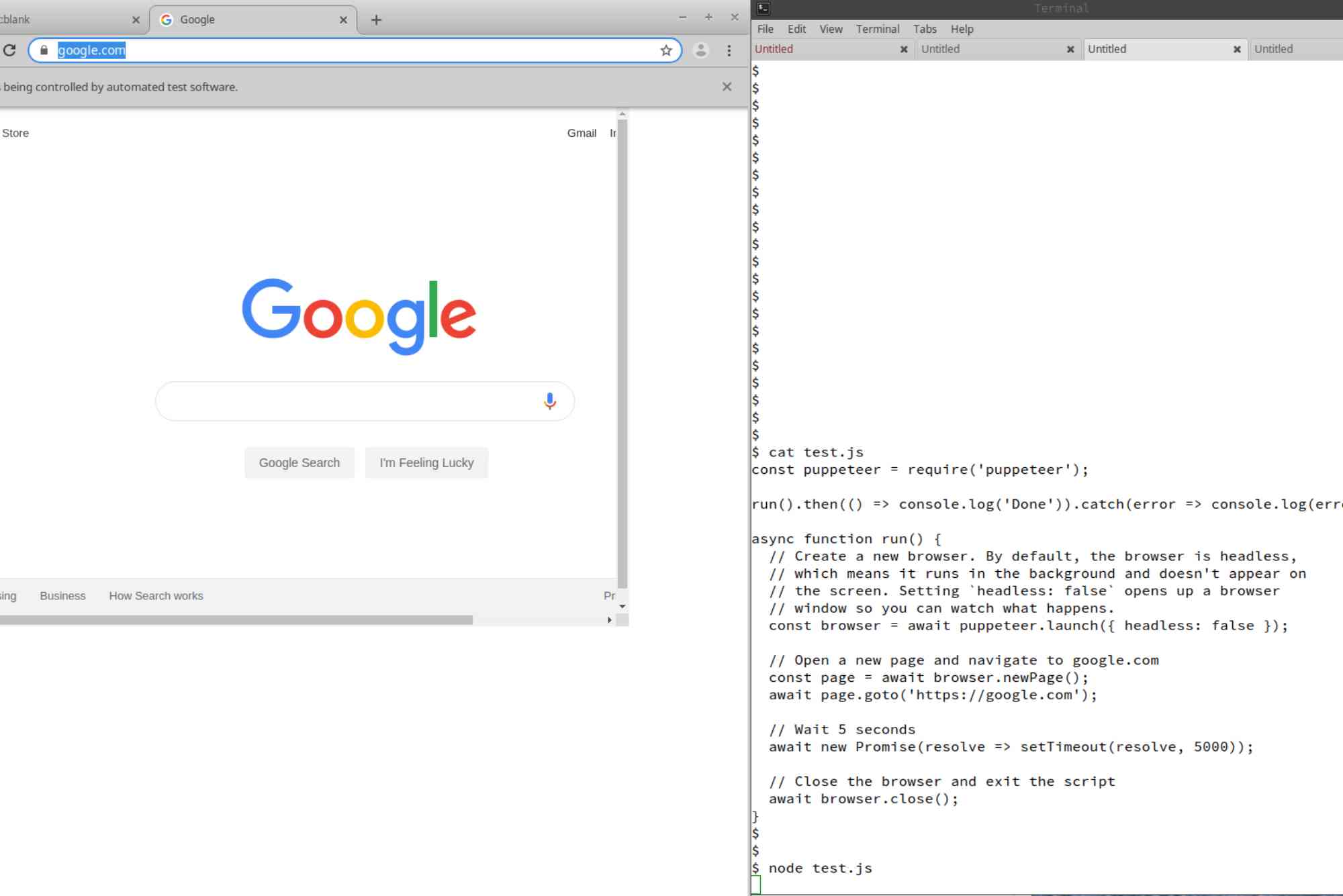
Chrome Is Being Controlled by Automated Test Software: What It Means
If you have ever opened Google Chrome and noticed a small notification at the top saying “Chrome is being controlled by automated test software”, you might have wondered what it means. This message is not an error, but it can be confusing for everyday users. It typically appears when Chrome is launched in a special mode by an automation tool or script. In this article, we will explain the chrome is being controlled by automated test software meaning, why it happens, when it’s normal, when it might be a concern, and how to deal with it.
Understanding the Meaning
The message is essentially Chrome’s way of telling you that it is running under automation control. In plain terms, this means a program, script, or testing tool is interacting with Chrome instead of a human directly using the mouse and keyboard. This often happens in software testing, data scraping, or automated website interaction.
For example, developers use tools like Selenium, Puppeteer, or Playwright to test websites automatically. These tools can open Chrome, navigate pages, click buttons, and collect information — all without human involvement. Chrome shows the message to be transparent about its state so users are aware that automated actions are taking place.
Common Reasons Why the Message Appears
Website Testing by Developers
Software engineers frequently run automated browser tests to check website performance, design, and functionality. This message simply confirms the browser is running in test mode.
Automated Data Collection
Researchers or analysts sometimes use automation scripts to collect information from multiple web pages. If such a script is running on your system, Chrome will display the message.
Browser Extensions or Scripts
Certain extensions or locally installed scripts can also trigger this mode if they automate browsing tasks.
Malicious or Unwanted Programs
While the message is often harmless, it can also appear if malware or suspicious software tries to control Chrome without your consent. In such cases, it’s essential to investigate further.
Is It Safe?
In most cases, yes. If you intentionally run a testing script or a trusted program that automates Chrome, the message is expected and safe. However, if the message appears when you are not running any automation tools, it’s worth checking your system for unknown programs.
A quick safety check involves:
- Reviewing installed extensions in Chrome’s settings.
- Checking background processes in Task Manager.
- Running a malware scan using reputable security software.
How Chrome Automation Works
Automation tools communicate with Chrome through the Chrome DevTools Protocol. This protocol allows a program to issue commands such as:
- Open a URL.
- Click an element.
- Extract text or images.
- Capture screenshots.
Chrome starts in a special debugging mode, and the “being controlled by automated test software” message appears to make the user aware of this state.
Can You Remove the Message?
Yes, but whether you should depends on your situation. Developers sometimes remove it during testing to avoid visual distractions. This can be done by running Chrome with specific startup flags that disable the notification. However, for security purposes, Chrome does not offer a built-in option to hide it permanently in normal browsing.
If you’re an everyday user who is not running tests, the best way to make the message disappear is to close the automated session and open Chrome normally.
How to Fix or Stop the Message Appearing Unexpectedly
If you are not running any automation intentionally but keep seeing the message, follow these steps:
Check for Suspicious Extensions
Go to chrome://extensions and disable or remove any you do not recognize.
Review Startup Programs
Some applications may launch Chrome in automation mode when your computer starts. Disable unnecessary startup items in Task Manager.
Run an Antivirus Scan
Malicious software might be the cause. A full scan can identify and remove such threats.
Reinstall Chrome
If the problem persists, uninstall Chrome completely and reinstall a fresh copy from the official Google website.
Why Developers Need This Feature
For developers, automated testing saves enormous amounts of time. Instead of manually checking each page of a website, scripts can perform hundreds of actions in minutes. The message helps differentiate between real user activity and automated activity, which is important for debugging and avoiding confusion.
Real-World Scenarios
A quality assurance tester at a tech company might run a suite of tests on a new e-commerce website. The automation tool launches Chrome, logs in, adds products to the cart, and checks out — all while recording results. During these tests, the message appears in the browser, indicating automation control.
In another case, a data analyst might run a Python script with Selenium to collect pricing data from various online stores. Again, Chrome shows the notification to indicate it’s under automated operation.
My Experience with Chrome Automation
As someone who has worked on website development projects, I have seen this message countless times during automated UI testing. It is not a cause for concern when you know the source of the automation. In fact, it is a helpful reminder that you are not in a normal browsing session and should avoid doing personal tasks in that window.
The chrome is being controlled by automated test software meaning is straightforward once you understand it: Chrome is simply telling you that it’s under the control of a program instead of a human. In most cases, it’s part of legitimate testing or automation work. However, if you didn’t start any automation and the message keeps appearing, it’s important to investigate possible unwanted software. Automation is a powerful tool for developers, testers, and researchers, but for regular users, the safest approach is to ensure your browser is under your control. Keep your system clean, manage your extensions, and only run trusted programs.
Frequently Asked Questions
What does “Chrome is being controlled by automated test software” mean?
It means Chrome is running in a special mode where scripts or programs are automating actions in the browser.
Is it dangerous?
Not usually. If you know a trusted automation tool is running, it’s safe. But if you didn’t initiate it, check for malware.
How do I remove the message?
Close the automated session, or if you’re a developer, start Chrome without the automation flags.
Can malware cause this message?
Yes, malicious programs that control browsers can trigger it. Always run a security scan if you see the message unexpectedly.
Does this affect my browsing speed?
Automated test mode doesn’t inherently slow Chrome, but the actions being performed by scripts can use extra system resources.











